Quoting software: quotes customers can accept on their phone
Send line-by-line quotes with tax, optional extras and good-better-best options as a link your customer accepts online. Start a 14-day free trial of Primemgr.
Updated
The problem
Quotes go out as PDFs that have to be printed, signed and sent back. Half are never answered, and the ones that are come back with a question about a line nobody can explain.
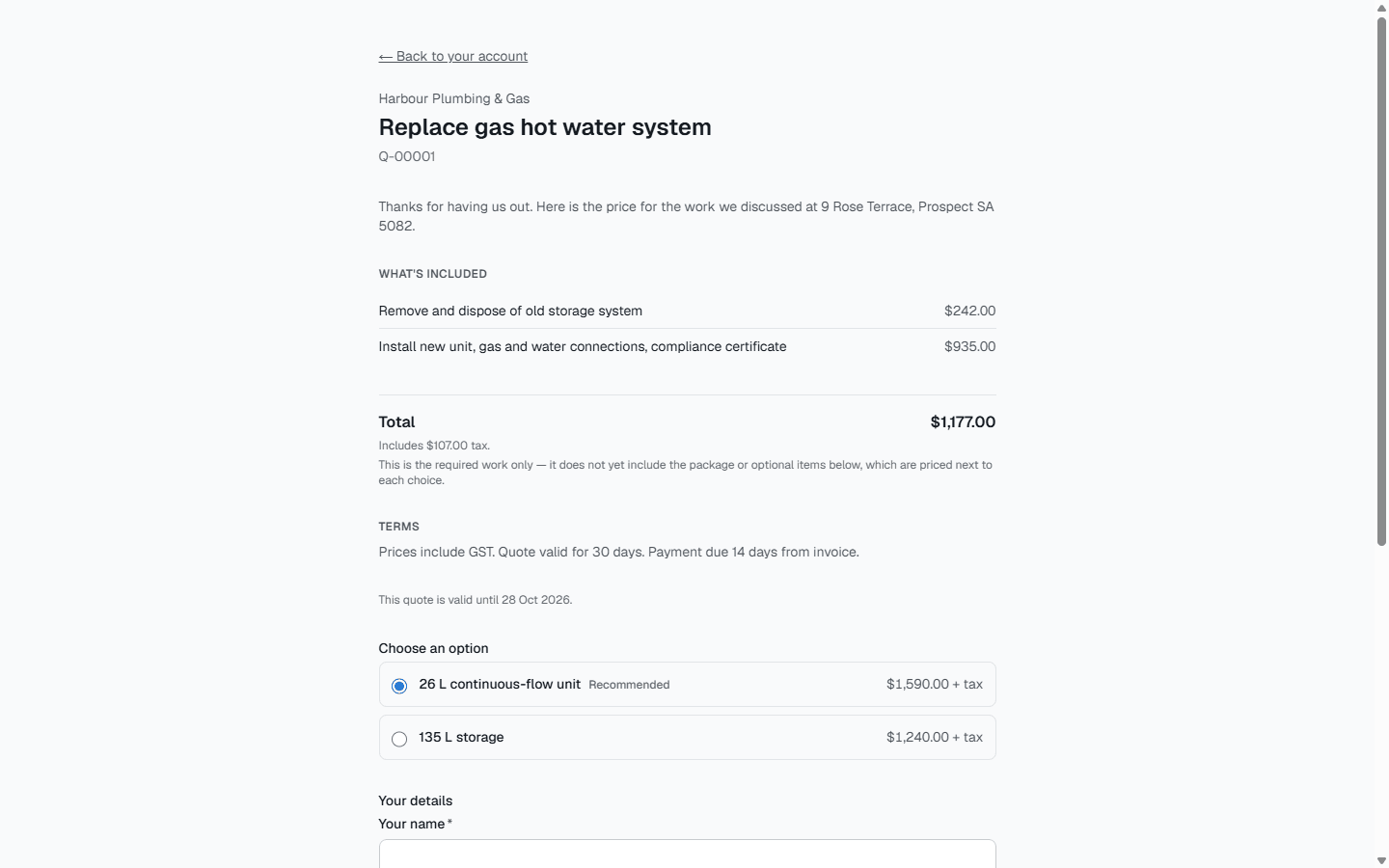
A quote in Primemgr is built line by line, sent as a link, and answered online. The customer sees exactly what they are agreeing to, and you see the moment they open it.
Build the quote
- Every priced line has a tax code, so tax is right on each line and in the total.
- Mark lines optional, for extras the customer can add or leave.
- Group alternatives, such as standard or premium parts, so the customer picks one.
- Add headings and notes to explain the work in plain words.
Send it as a link
Sending emails the customer from your business, with your name and reply-to address, and a link to the quote. The quote records when it was first viewed, so you know whether it has been read.
The customer decides online
On their phone or computer, the customer chooses between the options, includes or declines each optional line, and accepts or declines the quote. The total updates as they choose. A declined line is kept as deferred work with a follow-up date, so a no today can become a yes later.
Revise without losing the history
Revising a sent quote creates a new version and marks the old one superseded. Quotes can carry an expiry date and your terms.
From yes to invoice
An accepted quote becomes a draft invoice in one click, carrying only the lines the customer agreed to and the option they chose.
After the customer says yes
An accepted quote also becomes a job in one click, with a task for each line of work the customer agreed to. A quote follow-up automation tells your team when a sent quote has had no answer for three working days.
What it does not do yet
Customers cannot pay a deposit online yet.
Common questions
- Does the customer need an account to accept a quote?
- No. They open the link from the email and accept or decline on the page.
- Can I offer good, better and best options?
- Yes. Group alternative lines together and the customer chooses one; you can mark one as recommended.
- What happens to lines the customer declines?
- They are not invoiced. They are kept as deferred work with the customer’s reason and a follow-up date.
- Can I change a quote after sending it?
- Revise it. A new version is created and the old one is kept, marked superseded, so the history stays intact.